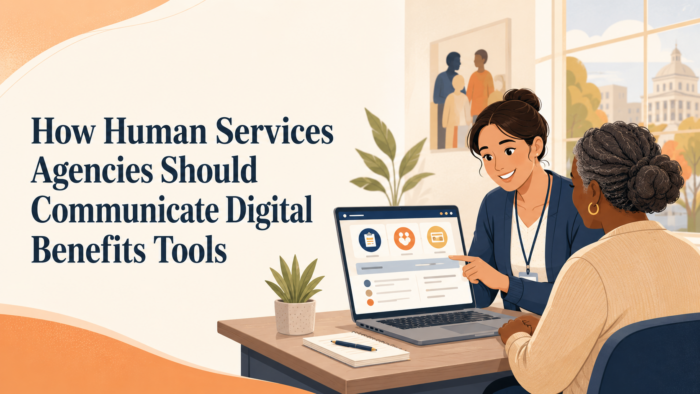
Portal Names Are Not Instructions: How Human Services Agencies Should Communicate Digital Benefits Tools
Human services agencies increasingly rely on digital tools to help residents apply for benefits, renew eligibility, upload documents, report changes, check case status, manage notices, and communicate with the agency. These tools may be branded as portals, accounts, mobile apps, eligibility systems, document upload centers, benefit dashboards, or self-service platforms. Inside the agency, those names may be familiar. They may connect to a vendor system, a statewide eligibility platform, a modernization initiative, or an internal service model. For residents, however, the name of a portal does not automatically explain what the tool does or what action they are expected to take.
That distinction matters because public communication often assumes that naming the tool is enough. A notice may tell residents to “log in to the portal,” “check your account,” “upload documents through the app,” or “visit the benefits system,” without clearly explaining what the resident should do once they get there. A resident may not know whether the portal is for applying, renewing, submitting proof, checking status, reading notices, scheduling an interview, updating contact information, or all of those things. When the tool name replaces the instruction, residents are left to translate agency terminology into practical action on their own.
For human services agencies, public benefits agencies, county social services departments, and state benefits offices, digital communication cannot stop at promoting access to a portal. The agency must explain the task, the reason for the task, the deadline, the steps inside the tool, and the alternatives available when residents cannot use the tool successfully. A digital system may be efficient from an administrative perspective, but it only supports access when residents understand how to use it for the specific benefit action in front of them. The portal is not the message. The resident’s next step is the message.
This issue is especially important because digital benefits tools often sit inside already complex processes. A household may be managing SNAP renewal, Medicaid status, cash assistance verification, child care eligibility, an address change, a document request, or an interview notice at the same time. The agency may have one portal for several programs, separate modules within the same account, or different tools for different actions. If communication does not clearly identify which tool is used for which step, residents may log in and still feel lost. They may upload the wrong document, miss a notice, assume a submission was accepted, or abandon the process because the path is not obvious.
A strong digital communication strategy treats portal language as part of the resident journey, not as a shortcut for instruction. It explains where to go, what to click or choose, what information to have ready, what confirmation to expect, and what to do if the tool does not work. It also keeps the language consistent across notices, texts, emails, websites, call center scripts, lobby signage, and community partner materials. Residents should not have to learn a new vocabulary every time they move from a mailed letter to a portal screen to a phone conversation.
The larger purpose is not simply to increase digital adoption. It is to make digital benefits tools usable, trustworthy, and connected to real resident needs. Human services agencies should want residents to use online tools when those tools make the process easier. But digital adoption cannot be built on vague instructions or branded portal names alone. It depends on communication that helps people understand what action belongs to them, how the digital tool supports that action, and where to get help when the tool is not enough.
A Portal Name Does Not Tell Residents What To Do
 A portal name may mean a great deal inside an agency. It may represent years of modernization work, a new eligibility platform, a vendor implementation, a statewide access initiative, or a consolidated digital service model. Residents do not usually bring that context with them. They may see the portal name for the first time in a notice, on a postcard, in a text message, or on a website button. Unless the communication explains the task clearly, the name itself does not tell them whether they need to apply, renew, upload, verify, report, confirm, appeal, or wait.
This is why portal-centered language can create confusion. A notice that says “use MyBenefits to complete your renewal” is stronger than a notice that says only “visit MyBenefits.” But even that may not be enough if residents do not know where the renewal task appears once they log in, what documents they need before starting, whether the renewal can be saved and returned to later, or how to confirm that it was submitted. The more consequential the benefit action, the less agencies should rely on residents to infer the step from the tool name.
Human services agencies should treat the portal name as a location, not an instruction. The instruction should still be written in plain language. The resident needs to know what action is required, why it matters, when it is due, and how the portal fits into completing it. The portal name can help direct traffic, but it should not carry the burden of explanation. When agencies separate the tool from the task, they make digital communication more understandable and reduce the risk that residents will enter the system without knowing what they are trying to accomplish.
Digital Benefits Communication Should Begin With the Resident Action
A stronger approach begins with the action residents must complete. If the resident needs to upload income proof, the message should say that first. If the resident needs to renew benefits, report a change, confirm contact information, read a notice, or check case status, that action should lead to communication. The portal should then be introduced as one way to complete that action. This order matters because residents need a clear purpose before they enter a digital tool that may contain several features, screens, tabs, messages, and program categories.
For example, a resident-facing message can say, “Upload your proof of income by the deadline listed in your notice. You can upload it in your online benefits account under ‘Documents.’” That is different from saying, “Log in to your online benefits account.” The first version gives the resident a task, a reason to use the account, and a location inside the tool. The second version sends the resident into a system and leaves them to determine what matters. In public benefits communication, that difference can affect whether a resident completes the step correctly.
Beginning with the resident action also helps agencies preserve alternatives. Not every resident can use a portal successfully. Some may lack reliable internet access, have limited digital literacy, rely on a phone with limited storage, need language assistance, have a disability, forget login credentials, or face document upload barriers. If the communication begins with the action, the agency can present the portal as one completion path while also naming other available options, such as mail, phone, in-person support, drop boxes, authorized representatives, or community partner assistance where appropriate. This reduces the chance that residents interpret digital use as the only path when other valid paths exist.
More Than Just Applications: Human Services and Public Benefits Communication Strategies for State and Local Agencies
This article is part of our series on strategic communication for Human Services Agencies, Public Benefits Agencies, and Health and Human Services departments. To learn more and to see the parent article, which links to other content just like this, click the button below.
Digital Tools Must Be Explained in Relation to Specific Benefits Processes
Public benefits portals often support multiple processes at once. Residents may be able to apply for benefits, renew eligibility, submit verification, report changes, read notices, check EBT information, view case status, update household details, or communicate with the agency. From a service design perspective, this consolidation may be useful. From the resident’s perspective, it can also be overwhelming. A tool with many functions needs clearer communication, not less. Agencies should explain how the tool connects to the specific process the resident is facing at that moment.
This is especially important when one portal supports multiple programs. SNAP, Medicaid, cash assistance, child care assistance, energy assistance, and related programs may have different renewal timelines, document rules, deadlines, and status meanings. If the portal displays all programs together, residents may not know which action belongs to which benefit. If the portal displays them separately, residents may not know where to find the task connected to the notice they received. Digital communication should bridge that gap by naming both the program and the action clearly.
A resident should not have to guess whether “documents needed” refers to SNAP income proof, Medicaid renewal information, cash assistance verification, or child care schedule details. The communication should identify the benefit affected, the specific task required, and the location inside the digital tool where the task can be completed. When agencies make that connection explicit, residents are more likely to use the tool correctly and less likely to call only to ask what the portal is asking them to do.
Portal Communication Is an Equity Issue, Not Just a Technology Issue
Digital benefits tools can expand access when they are communicated well. They can help residents complete tasks outside office hours, reduce travel, provide faster document submission, support status checking, and make notices easier to retrieve. But digital tools can also deepen barriers when agencies assume that access to a portal means the resident can use it effectively. Technology availability is not the same as usability. A resident may have a smartphone but no stable internet. They may be able to receive a text but not upload a readable document. They may create an account once and later forget the login. They may speak a language that the portal does not fully support. They may need assistance because of a disability or literacy barrier.
For this reason, portal communication should be designed around real access conditions. Instructions should be plain, specific, and readable on mobile devices. They should explain what residents need before they start, what steps they should expect, how to confirm completion, and what to do if they cannot use the digital tool. Agencies should also be careful not to frame digital access as a test of resident responsibility. The communication should support residents in completing the required action, not imply that failure to navigate a portal is a personal failure.
Equity also requires consistency across channels. Residents who cannot complete a task digitally should not receive a weaker or less clear path than residents who can. A notice should explain the portal option clearly while also naming other valid completion options when they exist. Call center staff should be prepared to help residents understand the same action path. Community partners should have accurate language to support residents who need help using the tool. A digital benefits strategy is only equitable when the communication system around it helps residents complete the task through the channel they can realistically use.
Agencies Should Communicate the Task Before the Tool
Digital benefits communication works best when it begins with what the resident needs to accomplish. The tool should come second. A resident may need to complete a renewal, submit proof of income, update an address, check whether a document was received, report a household change, read an eligibility notice, or confirm whether benefits are still active. Those actions are meaningful because they connect directly to the resident’s benefits. The portal is simply the place where some of those actions may happen.
When agencies lead with the tool instead of the task, the communication can become less useful. “Log in to your account” may sound simple, but it does not tell the resident why they are logging in, what they should look for, what screen matters, what document they need, or how to know when the task is complete. For residents managing more than one benefit, the problem becomes even more pronounced. They may enter the portal and see several program areas, notices, alerts, or document categories without knowing which one is connected to the letter, text, or email they received.
A clearer message starts with the resident action and then places the portal in service of that action. The agency might explain that the resident needs to upload a specific document, complete a renewal, check the status of a submitted form, or read a new notice. Only after that should the communication explain where the resident can complete the step digitally. This sequence helps the resident understand the purpose of the tool before they are asked to use it.
Portal Instructions Should Match the Actual User Journey
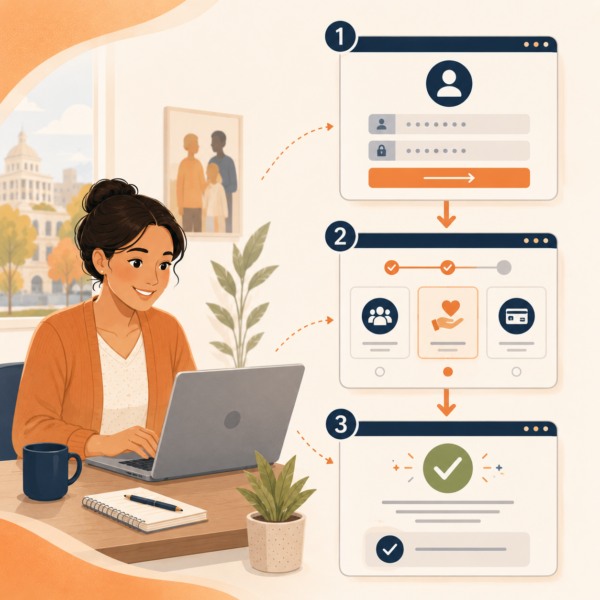
Agencies sometimes describe digital tools at a high level, while residents experience them as a sequence of small decisions. They have to find the right website, enter login information, reset a password if needed, choose the correct program, locate the task, identify the right document category, complete the form or upload, and confirm that the action was submitted. Each step can create confusion if the agency’s instruction is too broad. A resident who receives a message telling them to “upload your documents online” may still not know where the upload button is, which document type to select, or whether the upload completed successfully.
Digital communication should therefore reflect the actual path residents must follow. This does not mean every notice needs a lengthy technical manual. It means the agency should provide enough practical direction to prevent predictable confusion. If the task appears under a specific tab, category, notice center, case section, or document upload area, the instruction should say so. If residents need a case number, account login, phone number, email address, or identity verification step, the communication should prepare them before they begin. The goal is to reduce the number of places where residents can get stuck without knowing what went wrong.
This kind of journey-based instruction also improves staff support. Call center representatives, front desk staff, eligibility workers, and community partners can give more consistent guidance when public instructions match the actual portal experience. If residents call for help, staff should not have to translate a vague portal instruction into step-by-step guidance from memory. The agency’s written communication should already provide a clear foundation that staff can reinforce.
Confirmation Language Is Essential for Digital Trust
Digital benefits tools create uncertainty when residents do not know whether an action worked. A resident may upload a document, submit a renewal, report a change, or send a message through a portal, then wonder whether the agency received it. A button may say “submit,” a screen may refresh, or a file may appear in an upload history, but the resident may still not know whether the action is complete, under review, accepted, or still missing something. In public benefits programs, that uncertainty can lead directly to repeated calls, duplicate uploads, office visits, and avoidable anxiety.
Agencies should communicate clearly about what confirmation means. A digital receipt should not imply that a document has been approved if it has only been received. A submission confirmation should explain whether the agency still needs to review the information. A status message should distinguish between “received,” “under review,” “accepted,” “more information needed,” and “completed.” These distinctions matter because residents may otherwise assume that a successful upload fully resolves the case, only to receive another notice later and feel that the agency ignored their effort.
Strong confirmation language builds trust because it gives residents evidence that their action entered the system. It also helps them understand what comes next. A message that says the agency received the document, will review it, and will contact the resident if more information is needed can reduce unnecessary follow-up. A message that says the document could not be used and explains why can help the resident correct the problem more quickly. Digital trust depends not only on the technology working, but on residents understanding what the technology has done.
Digital Communication Should Avoid Creating a False Single Path
Public benefits agencies may want to encourage digital use because portals can reduce paperwork, speed up submissions, support after-hours access, and help residents manage information more directly. Those are valid goals. But communication should be careful not to make the portal sound like the only acceptable path when other valid options exist. Some residents will not be able to use the digital tool successfully, even when they want to. Others may need help because of language access, disability, literacy, device limitations, unstable internet, login problems, or document format barriers.
When a notice or text message implies that the resident must use the portal, people who cannot access it may delay action or assume they have no other option. That can create preventable benefit interruptions. A better message explains the digital option clearly while also identifying other available ways to complete the same task when those options exist. The agency can still encourage digital submission without closing off mail, phone, office, drop box, authorized representative, or partner-supported pathways that remain valid under program rules.
This approach strengthens equity and operational clarity. Residents understand that the agency prefers or offers a digital path, but they also understand how to complete the task if the portal is not workable for them. Staff can reinforce the same options instead of improvising workarounds. Community partners can help residents choose the appropriate path based on their circumstances. Digital communication should move residents toward completion, not trap them inside a channel they cannot use.
Portal Language Should Be Consistent With Notices, Scripts, and Partner Materials
Digital tools often introduce language that differs from mailed notices, call center scripts, eligibility terminology, and partner materials. A notice may say “renew your benefits,” while the portal says “redetermination.” A text may say “submit documents,” while the portal says “upload verification.” A staff member may tell a resident to “report a change,” while the online screen labels the same step as “case update.” These differences may appear small inside the agency, but they can create real uncertainty for residents who are trying to protect essential benefits.
Agencies should create a shared vocabulary for common digital tasks. The same resident-facing terms should appear across notices, portal screens, text reminders, emails, websites, lobby signage, staff scripts, and community partner guidance whenever possible. If a technical term must appear because it is built into the system, the agency should explain it in plain language. For example, the communication can state that a renewal may also be called a redetermination in the online account. This small bridge can prevent residents from thinking they are being asked to complete two different actions.
Consistency is especially important when residents move between channels during the same process. A person may receive a paper notice, log into a portal, call for help, and ask a community partner to review the instructions. If every channel uses different words, the resident may lose confidence in the process. If every channel reinforces the same action language, the resident is more likely to understand the task, complete it correctly, and trust that the agency is giving coordinated guidance.
Digital Instructions Should Prepare Residents Before They Log In
 A benefits portal can only help residents if they arrive with enough information to complete the task in front of them. Too often, residents are sent to a digital tool without being told what they should have ready. They may begin a renewal without income information, try to upload a document without knowing which file is needed, attempt to report a change without the right household details, or check case status without understanding which program the status applies to. When residents reach a screen and realize they are unprepared, they may abandon the task, start over later, call for help, or miss a deadline.
Human services agencies should use notices, texts, emails, websites, and call scripts to prepare residents before they enter the portal. The message should explain the purpose of the task, the information or documents needed, the expected steps, and the deadline. If the process requires a case number, account login, identity verification, recent pay stubs, address details, employer information, provider information, or household member information, that should be stated before the resident begins. This kind of preparation reduces frustration because residents are not discovering requirements one screen at a time.
Preparation also helps residents make better choices about which channel to use. A resident who knows they need a readable document upload may decide to use a computer, ask a partner organization for help, visit an office, or use another valid submission option. A resident who knows a renewal may take time to complete may avoid starting at the last minute on a phone with limited battery or connectivity. Clear preparation does not make the digital process longer. It makes the process more realistic and more likely to be completed correctly.
Error Messages Should Help Residents Recover
Digital benefits tools often fail residents at the exact moment they need help most. A login fails. A document will not upload. A file is too large. A password reset does not work. A screen times out. A notice cannot be opened. A task appears unavailable. An error message says something went wrong but does not explain what the resident should do next. In a commercial setting, this may be frustrating. In a public benefits setting, it can affect access to food assistance, health coverage, cash support, child care assistance, or another essential service.
Agencies should treat error messages as resident communication, not just system output. An error message should explain what happened in plain language and give the resident a recovery path. If a document upload fails, the message should explain whether the resident should try again, reduce file size, use another format, call for help, mail a copy, or use another approved submission method. If a login fails, the message should explain how to reset credentials or get assistance. If a deadline is involved, the message should help residents understand how to protect the submission path rather than leaving them stuck inside the tool.
Recovery language is especially important because residents may assume a digital failure is their fault. They may not know whether the system is unavailable, whether their document is unacceptable, whether the browser is incompatible, or whether they selected the wrong option. A clear message gives residents a next step and helps reduce the likelihood that they will abandon the task. It also reduces avoidable calls because staff are not left to explain preventable confusion after the fact.
Status Screens Should Translate System Progress Into Resident Meaning
Status screens are one of the most important parts of a digital benefits tool because they tell residents whether the process is moving. But many status screens rely on internal labels that do not translate into clear action. A case may be marked pending, incomplete, under review, received, approved, closed, renewed, or awaiting verification. Those terms may be accurate from the agency’s perspective, but residents need to know what each status means for them. They need to understand whether they should act, wait, call, provide documents, attend an interview, or expect another notice.
A stronger status screen connects each label to resident meaning. “Received” should explain that the agency has the submission but may still need to review it. “Under review” should explain whether any action is needed right now. “More information needed” should identify what is missing, who it applies to, and the deadline. “Complete” should explain what has been completed and whether any other program action remains. This language helps residents distinguish between progress, completion, and unresolved issues.
Status communication should also be consistent with mailed notices and reminders. If a resident receives a warning notice by mail but sees a different status online, the portal should help clarify which information is current and what action is required. Without that clarification, residents may not know whether to trust the letter, the portal, the text message, or the call center. A well-designed status screen gives residents one reliable view of where the case stands and what, if anything, they need to do next.
Digital Reminders Should Point to a Specific Action, Not Just the Portal
Text messages, emails, robocalls, and portal alerts can be useful reminders, but only when they identify the action clearly. A reminder that says “log in to your account” may prompt activity, but it may not produce completion. Residents need to know whether they are logging in to upload documents, finish a renewal, read a notice, check status, schedule an interview, update contact information, or respond to a request. Without that information, the reminder may send the resident into the portal without a clear purpose.
A stronger reminder names the task and the destination. It can say that the resident needs to upload proof of income, complete a renewal, read an important notice, or check whether the agency needs more information. It should also connect the action to the relevant benefit when possible. This is especially important for households receiving more than one benefit, because a reminder connected to SNAP may not satisfy a Medicaid requirement, and a child care assistance request may require different information from a cash assistance review.
Reminders should also avoid introducing new terminology. If the mailed notice says “renew your benefits,” the text should not suddenly say “complete your redetermination” unless the agency has already explained that the two terms refer to the same action. If the portal uses a required technical label, the reminder can bridge the language by saying that the resident may see the task under that label in the online account. Digital reminders should reduce uncertainty, not add another phrase residents must interpret.
Agencies Need a Plain-Language Digital Task Library
Human services agencies can strengthen digital communication by creating a shared library of plain-language task descriptions. This library should define common actions such as applying, renewing, uploading documents, reporting a change, checking status, reading a notice, updating contact information, completing an interview, replacing a card, or confirming household details. Each description should explain the action in resident-facing language, identify when the task is used, and provide standard wording for notices, portal pages, texts, emails, staff scripts, and partner materials.
A task library helps agencies avoid inconsistent wording across channels. Without one, different teams may describe the same action in different ways. Communications staff may write one phrase, eligibility teams may use another, portal screens may use a third, and call center representatives may improvise a fourth. Residents then have to decide whether those phrases mean the same thing. A shared task library reduces that burden and gives the agency a more disciplined communication system.
This library also supports future modernization. Digital tools change over time, but core resident actions remain relatively stable. Agencies may update portals, add mobile features, adjust forms, or change vendors, but residents will still need to understand what they are being asked to do. A plain-language task library gives agencies a durable foundation for communicating digital benefits tools clearly, even as technology changes.
Staff Need the Same Digital Instructions Residents Receive
Digital benefits communication can break down when staff and residents are working from different explanations of the same tool. A resident may receive a notice telling them to use an online account, then call the agency because they cannot find the task. If the staff member has to rely on internal system knowledge rather than the resident-facing instruction, the explanation may become more technical, less consistent, or disconnected from what the resident is actually seeing. This can make the resident feel that the notice, portal, and phone support are describing different processes.
Human services agencies should prepare staff with the same plain-language digital task guidance residents receive. Call center representatives, eligibility workers, lobby staff, navigators, supervisors, and contracted customer service teams should understand the resident-facing terms for common portal actions. They should know how the agency explains uploading documents, completing renewals, checking case status, reading notices, reporting changes, resetting account access, and confirming submission. The goal is not to turn every staff member into technical support. The goal is to make sure every public-facing staff member can reinforce the same action path.
This alignment is especially important when digital tools change. A new portal screen, account registration process, document upload feature, or status label can generate resident confusion quickly if staff are not prepared to explain it. Agencies should provide short, practical staff guidance before public messages go out. That guidance should include what residents will see, what they may misunderstand, what language staff should use, and where staff should direct residents when the issue requires technical or case-specific support.
Community Partners Need Digital Guidance They Can Safely Share
Community partners often help residents navigate benefits systems, especially when digital tools are difficult to understand. Libraries, schools, clinics, food banks, legal aid organizations, housing providers, workforce programs, child care resource organizations, immigrant-serving organizations, senior centers, and community-based groups may all help residents interpret notices, upload documents, create accounts, or understand case status. These partners can extend the reach of agency communication, but only if they receive guidance that is accurate, practical, and clearly bounded.
Partner materials should explain digital benefits tools in plain language without asking partners to become eligibility specialists or technology troubleshooters for every case. A strong partner guide can describe what the portal is used for, which common tasks residents may complete there, what information residents should have ready, what confirmation should look like, and where residents should go for official case-specific help. It should also make clear what partners should not promise, such as whether a submitted document has been accepted or whether a benefit will continue.
This kind of partner guidance protects both residents and agencies. Residents receive more consistent help from trusted community organizations. Partners can support basic navigation without unintentionally creating inaccurate expectations. Agencies reduce the risk that unofficial explanations will replace official instructions. When partner materials mirror the agency’s notices, portal language, and staff scripts, digital benefits communication becomes more coherent across the full support network residents actually use.
Agencies Should Measure Where Digital Instructions Are Failing
Digital communication should be evaluated by whether residents can complete the intended task, not only by whether a portal exists or a notice was sent. Agencies may see strong portal availability but still experience high call volume, incomplete uploads, missed renewals, duplicate submissions, wrong-program document uploads, abandoned online forms, password-reset spikes, or repeated questions from community partners. These signals show where the communication around the tool may not be clear enough.
Measurement should focus on the resident journey. If residents frequently log in but do not finish a renewal, the instructions may not prepare them for what they need before starting. If documents are uploaded to the wrong category, the portal labels or notice language may not match. If residents call after submitting documents, confirmation language may not explain the difference between received and accepted. If staff receive repeated questions about where to find a notice, the portal navigation path may need clearer public explanation.
This does not require agencies to treat every issue as a technology defect. Many digital failures are communication failures around the technology. The agency may not need a new system to improve the resident experience. It may need clearer instructions, stronger task labels, better reminder language, more useful error messages, staff scripts that match the portal, or a source-of-truth page that explains common digital actions. Measurement helps agencies identify where small communication improvements can reduce larger operational burdens.
Digital Benefits Communication Requires Source-of-Truth Discipline
When agencies use digital tools, residents often receive guidance across several channels at once. A mailed notice may reference the portal. A text may include a short link. A website may explain account setup. A call center script may describe document upload. A lobby flyer may show a QR code. A community partner may share an instruction sheet. If these materials are not coordinated, outdated or incomplete instructions can continue circulating long after the portal process changes.
A source-of-truth approach helps agencies keep digital benefits communication consistent. The agency should maintain a clear public page or official resource that explains the main digital tasks residents can complete, how to access the tool, what alternatives exist, how to get help, and how to confirm completion. This resource should be updated whenever portal screens, task names, submission methods, or support processes change. Other channels can then point back to the maintained guidance instead of becoming separate, competing explanations.
Source-of-truth discipline also helps staff and partners. When a resident asks whether an old flyer, screenshot, social media post, or community handout is still correct, staff should be able to point to one current place. When partners need to share digital instructions, they should be given language that aligns with the official resource. When leadership or communications teams promote digital tools, they should use the same task-based language that appears in notices and scripts. This consistency helps prevent digital modernization from becoming a maze of disconnected instructions.
Digital Modernization Should Include Communication Change Management
Agencies often treat portal launches, account updates, document upload improvements, or mobile app rollouts as technology projects. They are technology projects, but they are also communication change projects. Residents have to learn new names, new screens, new steps, new confirmation messages, and sometimes new expectations for how to interact with the agency. Staff have to explain those changes while continuing to manage cases and resident questions. Partners have to adjust the guidance they provide. If communication change management is not built into the rollout, confusion can undermine the value of the tool.
A stronger modernization approach identifies the communication impact before the tool goes live. Agencies should determine which resident actions are changing, which terms need to be standardized, which notices need revision, which staff scripts need updating, which partners need advance guidance, and which residents may need additional support. Public communication should explain what changed, what stayed the same, and what residents should do differently. It should also avoid promoting the tool in broad terms without explaining the specific benefits process it supports.
This approach makes digital modernization more credible. Residents are more likely to use a tool when they understand why it matters and how it fits into the process. Staff are more likely to support the transition when they have usable language for explaining it. Partners are more likely to reinforce the change when they know what residents will experience. Communication change management turns a portal rollout from a system announcement into a resident-centered service improvement.
Strategic Communication Support for Human Services and Public Benefits Agencies
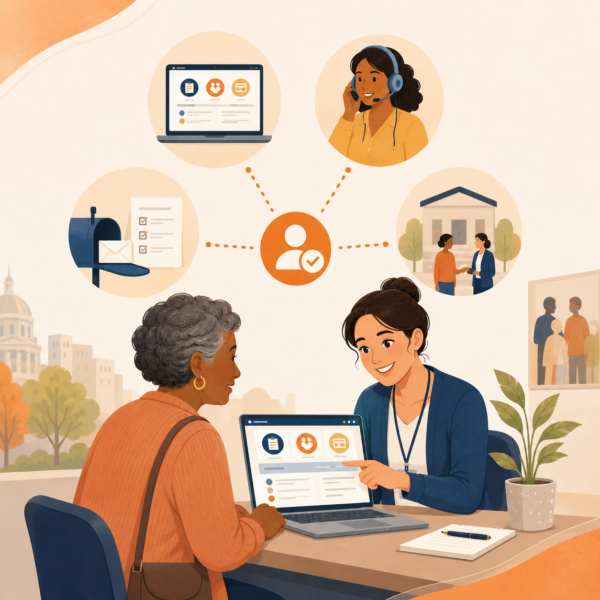 Digital benefits tools do not become understandable simply because an agency gives them a name, promotes a portal, or adds a link to a notice. Residents need communication that explains what the tool is for, what action they need to complete, how the digital process connects to their benefits, and where they can get help if the tool does not work for them. For human services agencies, public benefits agencies, county social services departments, and state benefits offices, this makes portal communication a core part of access, not a secondary technology message.
Because digital tools sit at the intersection of eligibility policy, technology systems, notices, call centers, staff workflows, community partners, language access, and resident behavior, many agencies benefit from structured communication support. Internal teams may understand the portal and the program rules, but that familiarity can make it harder to see where residents become confused. A resident may not know whether a portal is for renewal, verification, status checking, change reporting, or document upload unless the agency explains the task in plain language and connects that task to the tool.
Stegmeier Consulting Group (SCG) helps human services and public benefits agencies create communication frameworks that make digital benefits tools easier to understand and use. That support may include portal communication audits, plain-language task libraries, notice revisions, source-of-truth page development, call center scripts, partner guidance, resident journey mapping, digital rollout messaging, and alignment across websites, mailed notices, text reminders, lobby materials, and community-facing resources. The goal is not to promote digital tools for their own sake. The goal is to help residents complete essential benefit actions correctly, confidently, and through the most appropriate channel available to them.
This kind of support is especially useful when agencies are launching new portals, changing account systems, redesigning notices, increasing digital document upload, or trying to reduce avoidable calls and incomplete submissions. Strong communication helps residents understand the action before they enter the tool, staff explain the same process consistently, and partners support residents without creating conflicting guidance. Digital modernization works best when the communication system around it is as clear as the technology is intended to be.
Future Trends in Digital Benefits Communication
Human services agencies are likely to place greater emphasis on task-based digital communication as portals, mobile tools, online accounts, and automated reminders become more central to public benefits administration. Residents will increasingly expect to complete actions online, but they will also expect the agency to explain those actions clearly. A portal that technically allows renewal, upload, change reporting, or status checking will not reduce confusion if residents do not know where to go, what to do, and how to confirm that the action was completed.
Another likely trend is stronger integration between digital tools and resident-facing communication systems. Agencies will need to align portal labels with mailed notices, text reminders, call center scripts, website instructions, lobby materials, and partner guidance. The same action should not be called one thing in a notice and something entirely different inside the portal. As agencies continue to modernize, shared terminology and plain-language task descriptions will become more important to maintaining resident trust and reducing avoidable support needs.
Agencies may also invest more in digital journey measurement. Portal abandonment, password reset volume, wrong-category uploads, repeat calls after submission, incomplete renewals, and common error messages can all show where residents are getting stuck. These signals should not be viewed only as technology performance issues. They are communication signals as well. They can help agencies refine instructions, improve confirmation language, strengthen reminders, and make digital tools more usable for residents with different access needs.
Finally, digital communication will likely become more closely tied to equity and service design. Agencies will need to explain digital options clearly while preserving valid non-digital pathways for residents who cannot use the tool successfully. The strongest digital strategies will not assume that every resident can navigate a portal independently. They will provide clear instructions, accessible alternatives, staff support, partner guidance, and source-of-truth discipline so residents can complete the required action without being trapped by the channel.
Conclusion
Portal names are not instructions. A digital benefits tool may be useful, efficient, and well-designed from an agency perspective, but residents still need clear communication that explains what action is required and how the tool supports that action. When agencies rely on portal names, system labels, or broad digital promotion without plain-language guidance, residents may log in and still not know what to do next.
Human services agencies can make digital benefits tools more usable by communicating the task before the tool, matching instructions to the real user journey, explaining confirmation language, preserving non-digital pathways where available, and keeping terminology consistent across every channel. This approach supports residents who are applying, renewing, uploading documents, reporting changes, checking status, reading notices, or trying to understand whether benefits are at risk. It also supports staff, partners, and agency operations by reducing avoidable confusion before it becomes call volume, incomplete submissions, or missed deadlines.
In the end, digital modernization depends on more than technology adoption. It depends on whether residents can understand the process well enough to complete the right action at the right time. A portal should not become another barrier that residents have to interpret. It should be supported by communication that makes public benefits easier to navigate, more transparent, and more trustworthy.
SCG’s Strategic Approach to Communication Systems
Align your agency’s messaging, processes, and public engagement strategies.
Human services and public benefits agencies need communication systems that help residents understand digital tools through clear actions, not just portal names or branded account language. Digital benefits communication requires plain-language instructions, consistent terminology, accessible alternatives, staff alignment, partner guidance, and source-of-truth discipline so residents can complete essential tasks without unnecessary confusion.
SCG helps agencies create communication frameworks that connect digital tools to the real resident journey. Whether your agency is launching a new portal, improving document upload instructions, aligning status language, strengthening call center scripts, preparing partner materials, or creating clearer source-of-truth guidance, SCG can help you communicate digital benefits tools with clarity, consistency, and resident-centered precision. Use the form below to connect with our team and explore how a strategic communication system can help your agency make digital benefits tools easier to understand, easier to use, and more effective for residents and staff.