
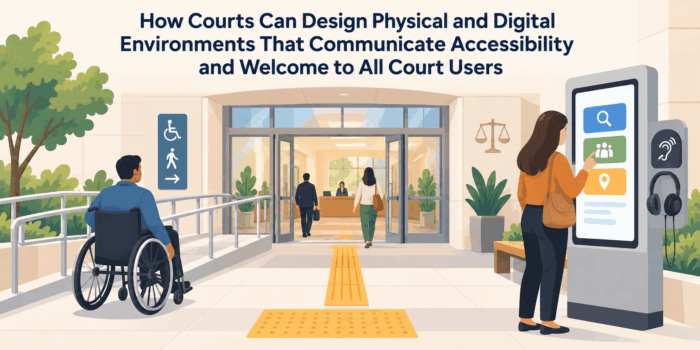
How Courts Can Design Physical and Digital Environments That Communicate Accessibility and Welcome to All Court Users
Courts communicate before anyone speaks with a clerk, enters a courtroom, or reads a formal notice. The design of the courthouse entrance, the clarity of directional signs, the accessibility of a website, the structure of a digital filing system, and the way public information is presented all shape a user’s first understanding of whether the institution is navigable, understandable, and prepared to serve them.
For many court users, these signals are especially important. People may arrive with disabilities, limited English proficiency, low digital literacy, unfamiliarity with legal procedures, transportation constraints, limited access to technology, or anxiety about appearing in a formal government setting. A physical or digital environment that assumes every user can see, hear, read, navigate technology, interpret legal terminology, and move through unfamiliar spaces without assistance can create barriers long before a judicial proceeding begins.
Accessibility therefore should not be treated as a narrow compliance task or as a set of isolated accommodations. Court administrators should consider how the entire user environment communicates access. People need to know where to go, how to request assistance, what to expect, how to use available technology, and where to find help when something does not work as expected.
A welcoming court environment does not compromise security, neutrality, formality, or judicial authority. It communicates that the institution has intentionally designed its public-facing systems so different people can participate. Physical and digital environments that are easier to navigate can also reduce operational friction by decreasing misdirected visitors, repeated questions, failed digital transactions, missed check-in steps, and unnecessary dependence on staff for basic orientation.
Treat Accessibility as a Communication System
 Accessibility is often discussed in terms of individual features such as ramps, elevators, accessible parking, screen-reader compatibility, captioning, or interpreter services. Each of these may be important, but court administrators should also examine how users learn that the feature exists and understand how to use it.
An accessible entrance has limited value if a visitor cannot determine where it is located. An accommodation request process may technically exist but remain difficult to find on the court website. A digital document may meet technical accessibility requirements while still being organized in language that users cannot easily understand.
Court administrators should therefore evaluate accessibility as a communication system connecting the physical environment, digital information, staff interactions, notices, signage, technology, and assistance procedures. Users should be able to identify available support without navigating several unrelated systems.
This broader approach also helps courts recognize that accessibility problems frequently occur between services. A person may successfully find accessible parking but encounter unclear entrance signage. Another may locate an accommodation page online but not understand where to report when arriving at the courthouse. Strong communication connects these individual elements into a usable experience.
Design the Court Experience From the User’s Point of Arrival
The first point of contact with a court may be a courthouse entrance, website homepage, hearing notice, map application, parking area, or online filing portal. Court administrators should identify these entry points and examine what a first-time user needs to understand immediately.
Physical arrival information may include where to park, which entrance to use, where accessible entrances are located, what to expect at security, and how to locate the correct courtroom or service. Digital entry points should make common tasks visible without requiring users to understand the court’s internal organizational structure.
Designing around arrival reduces uncertainty before users encounter more complex procedural information. It can be especially valuable for people with mobility limitations, sensory disabilities, cognitive disabilities, language barriers, or limited familiarity with government institutions.
An accessible and welcoming experience begins when the user first attempts to reach the court, not after they successfully find the right counter or courtroom.
Make Assistance Visible Before Users Have to Ask
People should not need extensive institutional knowledge to determine where accessibility assistance is available.
Courts can make accommodation information, language services, accessibility contacts, self-help locations, and other assistance visible at major entry points.
Early visibility gives users more control over their experience and reduces the need to disclose a difficulty repeatedly to different employees.
Court Communication Strategies for State and Local Judicial Systems: Building Public Trust, Improving Access to Justice, and Explaining Court Processes
This article is part of our series on strategic communication for State and Local Courts, Judicial Systems, and Court Administration. To learn more about court communication strategies for building public trust, improving access to justice, and explaining court processes, and to see the parent article, which links to other content just like this, click the button below.
Use Wayfinding to Reduce Cognitive and Physical Barriers
Courthouses can be difficult environments to navigate. Multiple floors, security checkpoints, courtroom numbering systems, administrative offices, elevators, self-help centers, and public counters may all be located within the same facility.
Court administrators should design wayfinding around the decisions users actually need to make. Signs should help people move from entrance to security, from security to check-in, and from check-in to the correct courtroom or service area.
Clear wayfinding can combine plain language, consistent terminology, recognizable symbols, strong visual hierarchy, and accessible placement. Information should be positioned where users need to make a decision rather than only where signs are convenient to install.
Consistency matters as well. The name used for a destination on a hearing notice should match the name used on courthouse signs and digital maps. Users should not have to determine whether two different labels refer to the same location.
Design Signage for People Who Do Not Already Understand the Court
Internal terminology can make sense to court employees while remaining confusing to visitors. Abbreviations, division names, courtroom classifications, and administrative labels may provide little guidance to someone attending court for the first time.
Court administrators should evaluate whether public signs describe destinations in terms users can recognize. A sign should help a person identify where to file documents, request assistance, locate a hearing, or reach a self-help service.
This does not require eliminating official names. Formal terminology can remain while explanatory language helps users understand its function.
Signage becomes more effective when it answers the practical navigation question facing the user. The objective is not merely to label the building but to help people move through it independently.
Make Accessibility Information Easy to Find Online
Court websites are often the first place users look for accessibility information, yet those resources may be scattered across administrative pages or presented primarily in policy language.
Court administrators should make accommodation information visible from high-traffic areas of the website. Users should be able to identify how to request assistance, whom to contact, and what information may be needed without searching through multiple departmental pages.
Accessibility information should also appear where it becomes relevant. Hearing preparation pages, jury information, filing guidance, courthouse location pages, and remote appearance instructions can connect users directly to applicable assistance.
This distributed approach recognizes that people may not begin their search by looking for a page labeled accessibility. They may encounter the need while trying to complete another task.
Build Digital Accessibility Into the Structure of Court Information
Digital accessibility involves more than making individual webpages or documents technically readable by assistive technologies. The broader structure of the information must also be usable.
Court administrators should consider heading structure, link clarity, document organization, form labels, keyboard navigation, captioning, contrast, text alternatives, and other elements that affect how users interact with digital content.
Content should also be organized predictably. A technically accessible website can remain difficult to use if important information is buried within complex navigation or presented through unexplained legal terminology.
Accessibility should be considered during content creation and technology procurement rather than addressed only after systems have already been built. Designing it into the structure from the beginning is more sustainable than repeatedly repairing inaccessible content later.
Design Forms and Documents for Usability as Well as Compliance
Court users frequently rely on forms, notices, instructions, and downloadable documents. These materials should be evaluated both for accessibility and for practical usability.
Forms should make clear what information is being requested and how users should move through the document. Instructions should be connected to the fields or steps they explain rather than requiring users to switch repeatedly between separate materials.
Digital documents should be structured so assistive technologies can interpret headings, fields, tables, and reading order appropriately. Printed versions should also consider readability, spacing, hierarchy, and the amount of information presented at once.
A form can be legally accurate and technically accessible while still creating unnecessary difficulty. Court administrators should therefore evaluate whether users can understand and complete the document with reasonable independence.
Communicate Security Procedures Without Creating Additional Barriers
Security is essential to courthouse operations, but the security process can be confusing or intimidating for first-time visitors. People with disabilities, medical devices, mobility aids, service animals, communication needs, or other circumstances may have additional concerns about what will happen at screening.
Court administrators should provide clear pre-arrival information about security where appropriate. Users should understand basic restrictions, where screening occurs, and how to seek assistance if they have an accessibility-related need.
On-site communication should also help people understand what is expected without relying entirely on shouted instructions or assumptions that everyone can see or hear the same cues.
Clear security communication supports both accessibility and operational efficiency. Visitors arrive better prepared, staff encounter fewer avoidable misunderstandings, and necessary security procedures become easier to navigate.
Make Welcome Visible Without Making the Court Informal
A welcoming environment does not require a court to appear casual or diminish the seriousness of judicial proceedings. The objective is to communicate that the institution is organized for public use.
Simple design choices can contribute to this message. Clear entrances, visible information points, understandable signs, accessible seating, well-marked assistance locations, and orderly digital navigation all communicate that users are expected and that the system has been designed with their participation in mind.
Staff interactions reinforce the same environment. Employees who can explain where users should go, identify accessibility resources, and provide consistent procedural directions help translate physical and digital design into a coherent experience.
For court administrators, welcome is therefore not primarily a matter of decoration or tone. It is the practical result of reducing unnecessary uncertainty and making access visible throughout the user experience.
Design Courthouse Entrances Around Multiple Types of Access
The courthouse entrance is one of the clearest signals of whether accessibility has been considered as part of the public experience. Court administrators should evaluate entrances not only for physical compliance but also for visibility, clarity, and ease of use.
Accessible entrances should be easy to identify from parking areas, sidewalks, transit stops, and drop-off points. If the accessible entrance differs from the main public entrance, signs should make that route obvious before a user reaches a barrier.
Administrators should also consider how weather protection, door operation, gradients, surface conditions, and security procedures affect the actual experience of entering the building. A route that technically exists but is difficult to locate or use may still create substantial friction.
Entrance design should communicate that different users have been anticipated. Clear routes, consistent signs, and visible assistance reduce uncertainty at the first point of physical contact.
Make Check-In and Service Counters Easier to Navigate
Once inside the courthouse, users need to determine where to check in, ask questions, submit documents, or wait for assistance. These areas can become confusing when several service functions are concentrated in one public space.
Court administrators should make the purpose of each counter or check-in point clear. Signage, queue systems, ticketing displays, and staff directions should use consistent terminology and avoid internal abbreviations that are unfamiliar to visitors.
Counter design should also consider height, reach, seating, acoustics, hearing assistance, privacy, and the ability to communicate comfortably with staff. Physical accessibility and communication accessibility should be considered together.
A well-organized service area reduces unnecessary movement and repeated explanations. It also helps users identify the correct destination without depending entirely on informal staff intervention.
Design Waiting Areas to Support Different User Needs
Court waiting areas often serve people who may spend significant time in the building. The design of these spaces can affect whether users feel able to remain, understand what is happening, and respond when their case is called.
Administrators should consider seating variety, accessible routes, space for mobility devices, visibility of information displays, acoustics, lighting, and proximity to restrooms or assistance points.
Communication systems in waiting areas should not rely on a single mode. A purely audible announcement may not serve people who are deaf or hard of hearing, while a visual display alone may not serve people with low vision. Multiple communication methods can reduce these barriers.
Waiting areas should also make it clear where users should remain and how they will know when action is required. Uncertainty about whether a case has been called or whether someone is waiting in the correct place can create unnecessary stress.
Improve Accessibility Through Consistent Visual Hierarchy
Visual design affects how quickly users can identify important information. Court environments often contain large amounts of text, signs, notices, instructions, and warnings competing for attention.
Court administrators should establish a clear hierarchy so users can distinguish destinations, required actions, assistance information, and general background content.
Typography, spacing, sign placement, heading structure, and consistent use of symbols can all help users scan information more efficiently. The goal is not decorative uniformity but functional clarity.
A consistent visual system across physical and digital environments also helps users build familiarity. When the same terminology and visual logic appear on a website, notice, kiosk, and courthouse sign, the overall system becomes easier to understand.
Avoid Information Overload at Decision Points
Users should not be required to process a wall of instructions when they need to make one immediate decision.
Court administrators can separate critical action information from secondary details and place supporting content nearby or through an additional step.
Reducing clutter at decision points improves accessibility for users with cognitive, visual, language, or attention-related challenges.
Build Accessibility Into Kiosks and Self-Service Technology
Many courts use kiosks for check-in, payment, case lookup, forms, or other self-service functions. These tools can improve efficiency but can also create new access barriers if they are designed for only one type of user.
Court administrators should consider screen height, touch targets, keyboard access, audio support, language options, time limits, readability, and compatibility with assistive technology where applicable.
The interface should use plain language and clearly identify what happens after each action. Users should not be left wondering whether a check-in or payment was successfully completed.
Alternative assistance should remain available when a user cannot operate the kiosk independently. Self-service technology should expand access rather than make human help unavailable.
Design Online Navigation Around Common Court Tasks
Court websites frequently reflect internal organizational structures. Users may encounter menus based on divisions, departments, or legal categories they do not understand.
Court administrators should organize digital navigation around common user tasks such as finding a hearing, filing a document, requesting an accommodation, locating a courthouse, paying a fee, accessing self-help, or obtaining interpreter information.
Task-based navigation can coexist with formal organizational information. The key is to give first-time and infrequent users a pathway that does not require prior knowledge of how the court is structured.
The strongest digital environments help users reach the correct information in as few interpretive steps as possible.
Make Mobile Access a Core Accessibility Consideration
Many court users access information primarily through smartphones rather than desktop computers. A website that functions well only on a large screen may create significant barriers.
Court administrators should ensure that core tasks, forms, maps, contact information, accommodation requests, and hearing instructions remain usable on smaller devices.
Mobile design should consider large touch targets, readable text, simple navigation, limited horizontal scrolling, and forms that can be completed without excessive zooming or reformatting.
Mobile accessibility is particularly important for users who do not have reliable access to a computer at home. Designing for mobile use expands the practical reach of the court’s digital environment.
Make Error Messages and Failed Transactions Understandable
Digital systems often become most difficult to use when something goes wrong. An inaccessible or vague error message can leave a user uncertain whether a filing was submitted, a payment was processed, or a form was saved.
Court administrators should work with technology teams to make errors specific and actionable. The system should explain what happened, what the user can do next, and where assistance is available if the problem cannot be resolved independently.
Error messages should avoid technical language that reflects the internal system rather than the user’s task. A person does not need to understand a server code to know that a submission failed.
Clear recovery paths are an important part of digital accessibility. They reduce repeated attempts, duplicate transactions, and unnecessary calls to court staff.
Communicate Accommodation Requests in a Clear and Respectful Way
Users may need accommodations related to mobility, hearing, vision, communication, cognition, or other access needs. The process for requesting assistance should be easy to understand and should not require users to navigate unnecessary administrative complexity.
Court administrators should explain where requests are submitted, how early they should be made when advance notice is needed, what information may be required, and whom to contact with questions.
The language should focus on access rather than making users feel that they are asking for an exceptional favor. The communication should also respect privacy and avoid requesting more information than is necessary for the process.
A clear accommodation pathway gives users greater confidence that they can participate and reduces last-minute uncertainty for both the individual and court staff.
Connect Accessibility Across Physical and Digital Environments
 Court users frequently move between digital and physical systems. They may review a website, receive a notice, use an online map, arrive at a courthouse, check in at a kiosk, and then rely on signs to reach a courtroom.
Court administrators should examine whether accessibility remains consistent across that sequence. Information about accessible entrances, parking, accommodations, security procedures, and assistance should match what users encounter when they arrive.
Digital maps should use the same destination names as physical signs. Online instructions should reflect the actual entrance and check-in process. Accommodation information should connect to staff who understand the procedure.
The strongest court environments feel like one coordinated system rather than a series of unrelated physical and digital experiences.
Design Courtrooms for Participation, Not Just Presence
Accessibility within the courtroom should be evaluated in terms of whether people can meaningfully participate once they arrive. A person may be able to enter the building and reach the courtroom but still encounter barriers involving seating, acoustics, visibility, communication technology, or movement within the room.
Court administrators should consider how courtroom design affects litigants, jurors, witnesses, attorneys, interpreters, and members of the public with different access needs. Accessible seating should be integrated into the room rather than treated as an afterthought, and sightlines should support users who rely on visual communication or assistive technology.
Audio systems, microphones, hearing assistance, monitors, and remote participation tools should also be evaluated as part of the accessibility environment. Technology that is difficult to hear or see can create barriers even when the physical space itself is accessible.
A courtroom that supports participation communicates that access is part of the institution’s operating standard rather than a special exception created only when someone raises a problem.
Build Accessibility Into Jury Communication and Jury Spaces
Jurors interact with the court differently from litigants, but they encounter many of the same physical and digital accessibility issues. Jury summonses, reporting instructions, parking information, security procedures, waiting areas, online questionnaires, and courtroom orientation should all be designed with access in mind.
Court administrators should ensure that jurors can easily locate accommodation information before reporting. Requests involving mobility, hearing, vision, communication, or other access needs should be explained in plain language and connected to a clear process.
Physical jury spaces should also be reviewed for seating, movement, acoustics, restroom access, and the ability to remain in the environment for extended periods.
Strong jury accessibility communication reduces uncertainty before arrival and helps prevent avoidable problems on reporting days.
Make Remote Proceedings Accessible by Design
Remote and hybrid court proceedings can expand access for some users while creating new barriers for others. Court administrators should treat virtual participation as a distinct accessibility environment rather than assuming that moving a hearing online automatically makes it easier to attend.
Users may encounter difficulties involving captions, audio quality, device compatibility, bandwidth, platform navigation, camera placement, or unfamiliar controls. Instructions should explain how to join, how to test equipment, what to do if a connection fails, and where to seek assistance.
Courts should also consider how interpreters, assistive technologies, and accommodations function within the remote platform. Accessibility features should be tested within the actual hearing workflow rather than evaluated only in isolation.
A well-designed remote environment gives users clear expectations and recovery options. It reduces the likelihood that technical difficulty becomes a barrier to participation.
Provide a Clear Alternative When Remote Access Does Not Work
Remote participation should not become the only practical option for users who cannot access the technology successfully.
Where appropriate, courts should explain available alternatives, assistance channels, or procedures for reporting access problems.
A visible fallback path communicates that the system anticipates technology failures and does not place the entire burden on the user.
Use Plain Language Across Physical and Digital Environments
Accessibility is weakened when users can technically reach information but cannot understand it. Court administrators should apply plain-language principles consistently across signage, webpages, kiosks, forms, notices, maps, and accommodation instructions.
Internal terminology should be reviewed from the perspective of a first-time court user. Labels such as division names, filing categories, or procedural terms may need short explanations so users can connect the formal term to the task they are trying to complete.
Plain language does not require courts to eliminate legally necessary terminology. It requires the surrounding communication to make that terminology usable.
When physical and digital environments use the same clear language, users can move between them more confidently and with less dependence on staff.
Build Language Access Into the Accessibility Environment
A court can be physically accessible while remaining difficult to use for people with limited English proficiency. Court administrators should therefore consider language access alongside disability access, digital usability, and wayfinding.
Multilingual signage, interpreter information, translated high-value instructions, and visible language assistance pathways can make it easier for users to understand where to go and how to obtain support.
Language options should also be integrated into digital environments. A user should not need to navigate several English-language pages before discovering that translated information or interpreter services are available.
Treating language access as part of the overall accessibility environment creates a more inclusive system and reduces the tendency to manage each type of access need in a separate administrative silo.
Design for Users With Cognitive and Processing Challenges
Court environments can be overwhelming even when all necessary information is technically available. Long instructions, dense signage, multiple decision points, unfamiliar terminology, and time pressure can create significant barriers for users with cognitive disabilities or processing challenges.
Court administrators can reduce these barriers by simplifying navigation, breaking complex tasks into steps, limiting unnecessary choices, and presenting information in a clear sequence.
Consistent layouts and repeated terminology can also help users orient themselves. A person should not have to relearn how information is organized each time they move from a notice to a website to a kiosk.
Designing for cognitive accessibility often improves the experience for everyone. Clearer structure benefits first-time users, people under stress, older adults, and users with limited familiarity with court procedures.
Create Quiet and Low-Stimulation Options Where Feasible
Courthouses can be noisy, crowded, and unpredictable. For some users, including people with sensory sensitivities, anxiety-related conditions, or other disabilities, these environments can make participation more difficult.
Where feasible, court administrators can identify quieter waiting areas, reduced-stimulation spaces, or procedures for requesting an alternative waiting arrangement.
Information about these options should be clear enough that users do not need to negotiate informally with multiple staff members to discover whether assistance is available.
Not every facility will be able to provide the same type of space, but recognizing sensory accessibility as part of the environment can help courts identify practical improvements within existing constraints.
Make Assistance Points Easy to Identify
People entering a courthouse should be able to identify where they can ask for help without wandering through multiple service areas.
Information desks, self-help centers, accessibility coordinators, interpreter check-in locations, and other assistance points should be clearly marked and consistently described.
Digital environments should provide the same clarity. Contact pages should explain what each office can help with rather than presenting only department names and phone numbers.
Visible assistance points reduce uncertainty and give users a reliable place to recover when they become lost, confused, or unable to complete a task independently.
Test Accessibility With Real User Journeys
Technical standards are important, but they do not always reveal how a user experiences the entire system. Court administrators should periodically test common journeys from beginning to end.
A review might follow the experience of a user who needs accessible parking, an interpreter, a remote accommodation, or assistance navigating a digital filing system. The objective is to identify where a seemingly accessible process breaks down between individual steps.
Testing should examine how information moves across notices, websites, maps, signs, security, check-in, courtrooms, and follow-up communication.
This approach helps administrators identify barriers that remain invisible when each component is reviewed separately.
Use Feedback to Identify Accessibility Gaps That Staff May Not See
Court employees become familiar with the environments in which they work and may not notice obstacles that are obvious to first-time users.
Court administrators can gather feedback from court users, disability organizations, interpreters, self-help programs, accessibility coordinators, and front-line staff to identify recurring problems.
Feedback should focus on specific experiences such as difficulty locating an entrance, understanding a digital form, hearing an announcement, finding accommodation information, or navigating between services.
Using these observations to guide improvements helps courts move beyond assumptions about accessibility and design around the barriers people are actually encountering.
Build Accessibility Into Every Major Court Modernization Project
Accessibility becomes harder and more expensive to address when it is added after a new building, website, filing platform, kiosk, or communication system has already been implemented.
Court administrators should incorporate accessibility requirements into planning, procurement, design review, testing, and implementation from the beginning.
This includes both technical standards and user communication. A new system should not only function accessibly but also explain itself clearly to people who encounter it for the first time.
Embedding accessibility in modernization projects creates more durable improvements and helps ensure that innovation expands participation rather than introducing a new generation of barriers.
Establish Courtwide Ownership for Accessibility Communication
Accessibility improvements are difficult to sustain when responsibility is divided across facilities, information technology, court administration, security, communications, and individual program offices without a clear coordination structure. Court administrators should establish ownership for how accessibility is communicated across both physical and digital environments.
This does not mean centralizing every operational responsibility within one office. Facilities teams may manage entrances and signage, technology teams may oversee websites and kiosks, and accessibility coordinators may handle accommodation processes. The communication system should still connect those functions so users receive consistent information.
Court administrators should identify who is responsible for reviewing public-facing accessibility information, approving updates, coordinating terminology, and ensuring that changes in one environment are reflected in another. A relocated accessible entrance, new digital filing platform, or changed accommodation process should trigger communication updates across all relevant channels.
Clear governance reduces fragmentation and makes accessibility easier to maintain as court operations evolve.
Build Accessibility Review Into Procurement and Contracting
Many accessibility barriers originate before a system ever reaches the public. Websites, kiosks, scheduling platforms, audiovisual systems, digital forms, and facility improvements may be purchased without sufficient attention to how diverse users will interact with them.
Court administrators should incorporate accessibility expectations into procurement and vendor evaluation rather than waiting to identify problems after implementation.
Contracts can require vendors to demonstrate how products support accessibility, usability, assistive technologies, mobile access, captioning, keyboard navigation, readable interfaces, and other relevant functions. Courts should also evaluate whether vendor documentation and user instructions are understandable.
Procurement decisions should consider the entire user experience. A product may include accessible technical features while still creating communication barriers because instructions, error messages, or navigation are difficult to understand.
Integrating accessibility into procurement helps courts avoid costly retrofits and makes access part of the original design standard.
Create a Formal Accessibility Audit Cycle
Accessibility should be reviewed periodically because facilities, technology, content, and user needs change over time. A courthouse that was reviewed several years earlier may now contain new signs, relocated services, aging technology, or altered traffic patterns that affect access.
Court administrators should establish recurring audits of physical and digital environments. Reviews can examine entrances, routes, public counters, waiting areas, signage, websites, digital documents, kiosks, remote hearing platforms, and accommodation information.
The audit should look beyond whether individual components technically meet standards. It should also evaluate whether users can understand and navigate the complete experience.
Findings should be prioritized according to both severity and frequency. A barrier affecting a high-volume entry point or essential digital process may require more immediate attention than a lower-use issue.
Maintain Accessibility During Renovations and Temporary Disruptions
Construction, renovations, technology upgrades, office moves, and temporary closures can disrupt accessibility even when the permanent environment is well designed.
Court administrators should include accessibility communication in operational transition plans. If an entrance closes temporarily, users should know where the accessible alternative is located. If an elevator is unavailable, the court should communicate available options before users arrive whenever possible.
Temporary digital changes also require attention. A replacement webpage, emergency filing process, or interim remote hearing platform should not bypass accessibility standards simply because it is expected to be short-lived.
Clear transition communication reduces the burden on users who might otherwise discover barriers only after reaching the courthouse or attempting to complete a digital task.
Build Accessibility Into Emergency Planning
Emergency procedures should account for court users with different mobility, sensory, communication, language, and cognitive needs.
Court administrators should review how evacuation instructions, shelter-in-place communication, emergency alerts, and building closures are communicated across multiple formats.
An emergency announcement that depends entirely on audio may not reach someone who is deaf or hard of hearing. A visual-only notification may not reach a person with low vision. Multiple communication methods can improve the likelihood that critical information reaches everyone.
Emergency planning should also consider visitors who are unfamiliar with the building. Accessible instructions need to be understandable without relying on detailed knowledge of courthouse layouts or internal terminology.
Coordinate Accessibility Information With Security Personnel
Security officers often serve as the first point of human contact in a courthouse. They may be asked where accessible entrances are located, how to reach elevators, whether mobility devices can pass through screening, or where a user can request assistance.
Court administrators should ensure that security personnel understand the court’s accessibility pathways and can provide consistent directions.
Security procedures should also be coordinated with communication about accommodations and assistive devices. Users should not receive one set of instructions online and a conflicting explanation at the entrance.
Providing security teams with current reference information helps integrate accessibility into normal courthouse operations rather than leaving visitors to locate specialized assistance after they encounter a barrier.
Train Staff to Recognize Environmental Barriers
Court employees can play an important role in identifying barriers because they observe how users interact with the environment every day.
Training can help staff recognize recurring problems such as people struggling to locate a service counter, confusion about an accessible entrance, difficulty using a kiosk, repeated requests for help with a digital form, or inability to hear announcements.
Employees should also know how to report these issues so observations become part of the court’s improvement process rather than remaining informal knowledge.
This approach turns accessibility into an ongoing operational responsibility. Staff become another source of information about how physical and digital design performs in real conditions.
Create a Simple Internal Reporting Path
Employees are more likely to report accessibility problems when the process is straightforward.
Court administrators can establish a clear channel for identifying broken equipment, confusing signage, inaccessible content, or recurring user difficulties.
A structured reporting process helps the court respond more quickly and identify patterns across locations or systems.
Maintain Consistency Across Multiple Court Locations
Court systems with several courthouses or service locations may develop different signage, terminology, accommodation processes, and digital instructions over time.
Court administrators should establish shared standards where practical so users encounter a recognizable accessibility framework across locations.
This may include consistent symbols, terminology, accommodation request information, wayfinding logic, website structures, and assistance signage.
Local facilities will still have different layouts and operational needs, but shared communication standards reduce the amount of relearning required when users visit another location.
Measure Accessibility Through User Success
Courts should evaluate accessibility not only by counting installed features but also by examining whether users can successfully complete common tasks.
Useful indicators may include repeated requests for directions, difficulty locating accessible entrances, accommodation-related complaints, abandoned digital forms, kiosk assistance requests, failed remote connections, or frequent questions about accessibility procedures.
These indicators should be interpreted carefully. They do not measure whether every user’s experience will be identical, but they can reveal where design or communication continues to create unnecessary friction.
Tracking these patterns before and after improvements can help administrators determine whether changes are making the court easier to navigate.
Use Accessibility Data to Prioritize Improvements
Courts rarely have unlimited resources for facility upgrades, technology replacement, or content redesign. Administrators therefore need a method for deciding which accessibility improvements should come first.
Data from audits, staff observations, user feedback, accommodation requests, website usage, and operational complaints can help identify the most consequential barriers.
Prioritization should consider both impact and reach. A modest improvement to a high-volume digital service may benefit more users than a larger project affecting a rarely used feature.
Using evidence to set priorities also helps courts explain why particular investments are being made and create a more systematic long-term improvement program.
Create a Long-Term Accessibility and Welcome Framework
Accessibility and welcome should be treated as continuing design principles rather than a sequence of isolated projects. Court administrators should develop a framework that connects facilities, technology, communication, staff practices, procurement, emergency planning, and modernization.
The framework should establish standards for how users enter the system, locate assistance, navigate physical spaces, access digital services, request accommodations, and recover when something goes wrong.
It should also include regular review because public expectations, technology, accessibility practices, and court operations continue to evolve.
A long-term framework gives courts a more durable way to improve access. Instead of correcting barriers one at a time, administrators can build a physical and digital environment in which accessibility and welcome are consistently communicated across the entire court experience.
Strategic Communication Support for Accessible Court Environments

Courts that want to improve accessibility and welcome across physical and digital environments need more than isolated facility upgrades or website changes. They need a communication framework that connects entrances, signs, service counters, forms, websites, kiosks, remote proceedings, accommodation processes, security information, and staff guidance into one coherent user experience.
Stegmeier Consulting Group (SCG) can support courts by evaluating public-facing communication across physical and digital touchpoints, developing wayfinding and information frameworks, improving plain-language content, strengthening accessibility communication, organizing digital navigation, developing staff reference materials, and creating communication standards that can be applied across locations and platforms. SCG can also help courts map user journeys to identify where people encounter unnecessary confusion, inconsistent terminology, or barriers between individual services.
External strategic communication support can be particularly valuable when accessibility responsibilities are divided across facilities, technology, court administration, security, and public information functions. SCG’s role remains focused on communication strategy, information design, stakeholder coordination, public-facing systems, and user experience. SCG does not provide legal advice, make judicial decisions, determine accommodation eligibility, certify technical accessibility compliance, or replace the specialized professionals responsible for legal, architectural, technology, or disability-access requirements.
Future Trends
Court accessibility will increasingly depend on the integration of physical and digital environments. Users may begin with a mobile website, receive digital hearing instructions, navigate to a courthouse using online maps, enter through an accessible route, check in electronically, and participate through courtroom technology. Courts will need to ensure that accessibility remains consistent throughout that entire sequence.
Digital modernization will also increase expectations for accessible-by-design technology. Online filing systems, case portals, kiosks, virtual hearings, automated notifications, and self-service tools will need to work for users with different devices, abilities, languages, and levels of digital literacy. Accessibility will become more difficult to treat as a feature added after implementation.
Artificial intelligence and automated assistance may also influence how users navigate court systems. These tools could help people locate services, interpret navigation options, or identify relevant accessibility resources, but courts will need strong controls around accuracy, privacy, neutrality, and the distinction between navigation assistance and legal guidance.
Physical courthouse design will continue evolving as well. Flexible service areas, hybrid proceedings, digital check-in, redesigned waiting spaces, and increased attention to sensory and cognitive accessibility may change how courts think about public environments. The strongest modernization efforts will treat accessibility, usability, security, and welcome as interconnected design goals rather than separate projects.
Conclusion
Court accessibility is communicated through every environment users encounter. An accessible entrance that is difficult to locate, a compliant website that is difficult to navigate, or an accommodation process buried within administrative content can still create meaningful barriers.
The strongest court environments make access visible. They help users understand where to go, what to expect, how to request assistance, how to recover when technology fails, and how to move between physical and digital services without unnecessary confusion.
Accessibility also benefits court operations. Clearer wayfinding, more understandable digital systems, consistent terminology, accessible forms, and visible assistance points can reduce repeated questions, misdirected visitors, failed transactions, and preventable dependence on staff for basic navigation.
When courts treat accessibility and welcome as part of the communication infrastructure of the institution, they create environments that are easier for everyone to use. The result is not a less formal court. It is a court that communicates more clearly that the public is expected, supported, and able to participate.
Stegmeier Consulting Group’s Strategic Approach to Communication Systems
Build physical and digital court environments that make accessibility, navigation, assistance, and participation clear from the first point of contact.
Court administrators need communication systems that help users understand how to enter, navigate, access services, request accommodations, use digital tools, and move confidently between physical and online court environments. Stegmeier Consulting Group (SCG) helps public institutions organize complex user journeys, improve plain-language and accessibility communication, strengthen wayfinding and digital navigation, align staff and public-facing information, and build durable frameworks that make accessibility and welcome visible throughout the court experience.
Use the form below to connect with our team and explore how strategic communication support can strengthen accessible and welcoming court environments.